Memcache:分布式缓存服务器,将数据缓存在内存中,基于键值对存储数据,不支持数据持久化,可以提高用户的访问速度并且缓解后端数据库的压力

服务器信息

IP 环境
172.16.1.12 LNMP

安装libevent

1
2
3
tar zxf libevent-2.0.22-stable.tar.gz
cd libevent-2.0.22-stable
./configure --prefix=/usr/local/libevent && make && make install

安装memcached

1
2
3
tar zxf memcached-1.5.9.tar.gz
cd memcached
./configure --prefix=/usr/local/memcached --with-libevent=/usr/local/libevent && make && make install

路径优化

1
ln -s /usr/local/memcached/bin/* /usr/local/bin

启动memcache

1
memcached -d -l 172.16.1.12 -p 11211 -u root -m 512 -c 2048 -P 

-d:后台允许memcache
-l:memcache监听的IP
-p:memcache监听的端口
-u:指定memcache的程序用户
-m:给memcache分配的内存大小,单位M
-c:memcache最大连接量,可自定义
-p:指定memcache的PID文件存放位置

php添加memcache模块

1
2
3
4
5
tar zxf memcache-2.2.7.tgz
cd memcache-2.2.7
phpize //生成configure文件,如果报错找不到该命令是因为没有对php程序做路径优化
./configure --enable-memcache --with-php-config=/usr/local/php/bin/php-config
make && make install

修改php配置文件

1
2
3
vi /usr/local/php/php.ini
添加:
extension=memcache.so

重启服务

1
service php-fpm restart

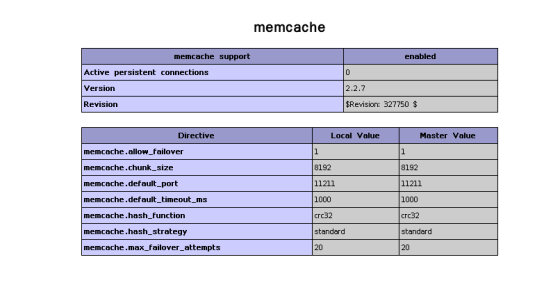
验证php是否成功连接memcache

1
2
3
4
vi /usr/local/nginx/html/index.php
<?php
phpinfo();
?>

访问172.16.1.12/index.php

upload successful

数据库授权

1
2
3
4
5
6
7
8
9
10
11
登录数据库
mysql -uroot -p123.com
创建测试使用的数据库和表
create database abc;
use abc;
create table test (id int,name char(10));
表中添加数据
Insert into test values (1,”one”),(2,”two”),(3,”three”),(4,”four”),(5,”five”);
数据库授权,允许php连接
grant all on *.* to ‘root’@’172.16.1.%’ identified by ‘123.com’;
flush privileges;

修改php测试代码

1
2
3
4
5
6
7
8
9
10
11
12
13
14
15
16
17
18
19
20
21
22
23
24
25
26
27
28
29
30
31
32
33
<?php
$memcachehost="172.16.1.12"; #指定memcache的节点ip
$memcacheport=11211; #指定memcache的端口
$memcache=new Memcache; #定义一个memcache的对选哪个
$memcache->connect($memcachehost,$memcacheport) or die ("could not connect"); #连接memcache
$query="select * from abc.test limit 5"; #执行客户端的指定语句,注意数据库和表
$key=md5($query); #对客户端要查找的数据进行hash计算
if(!$memcache->get($key)){ #判断 如果客户端的请求未命中
$name="mysql"; #第一行的数据内容
$conn=mysqli_connect("172.16.1.12","root","123.com"); #连接数据库
$result=mysqli_query($query);
while ($row=mysql_fetch_assoc($result)){ #去后端循环抓取
$arr[]=$row;
}
$memcache->set($key,serialize($arr),0,10); #将值缓存到memcache中
$data=$arr; #要返回给客户端的数据

}
else{ #如果客户端命中
$name="memcache"; #输出的第一行内容
$data_mem=$memcache->get($key); #通过hash计算的键获取到客户端的请求的值
$data=unserialize($data_mem); #要返回给客户端的数据
}
echo $name; # 以下为在客户端浏览器上显示出的页面内容
echo "<br>";
foreach($data as $a){
echo "id is $a[id]";
echo "<br>";
echo "name is $a[name]";
echo "<br>";
}
?>

访问172.16.1.12/index.php

upload successful