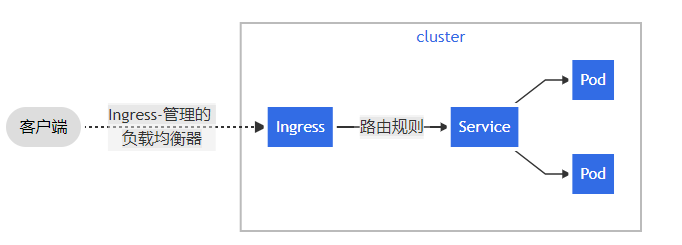
有了NodePort为什么用Ingress? NodePort得缺点:
是一个端口只能一个服务使用,端口需提前规划
只支持四成负载均衡
Ingrass Controller是什么? Ingress管理得负载均衡器,为集群提供全局得负载均衡能力;
Ingress是什么? Ingress公开了从集群外部到集群内部服务得http和https路由,流量路由有Ingress资源上定义的规则控制;
转发流程图:
Ingress使用流程: 1、部署Ingress Controller
2、部署Ingress Pod规则
注:如果不同命名空间得SVC想互相调用,需要在SVC后面加个”.{namespace_name}”
ingress两种转发模式 1、ingress部署完成之后需要部署svc对ingress端口进行暴露
user -> svc(nodeport) -> ingress controller pod -> 节点Pod
2、添加hostNetwork将ingress端口应用到物理机中
user -> ingress controller pod -> 节点Pod
推荐第二种,性能会高与第一种;
高可用Ingress演示(http代理访问) 部署keepalived 1 2 3 4 5 6 7 8 9 10 11 12 13 14 15 16 17 18 19 20 21 22 23 24 25 26 27 28 29 30 31 32 33 34 35 [root@pool2 ~] [root@pool2 ~] ! Configuration File for keepalived global_defs { router_id ingress } vrrp_instance VI_1 { state MASTER interface ens33 virtual_router_id 51 priority 100 advert_int 1 authentication { auth_type ingress auth_pass ingress } virtual_ipaddress { 172.16.1.23 dev ens33 label ens33:1 } } [root@pool2 ~] [root@pool2 ~] [root@pool2 ~] inet 172.16.1.23/32 scope global ens33:1 [root@pool3 ~] [root@pool3 ~] [root@pool3 ~] [root@pool3 ~]
有必要得情况下加一个HAproxy
创建nginx pod 1 2 3 4 5 6 7 8 9 10 11 12 13 14 15 16 17 18 19 20 21 22 23 24 25 26 27 28 29 30 31 32 33 34 35 36 37 38 39 40 41 42 43 44 45 46 47 48 49 50 51 52 53 54 55 56 57 58 59 60 61 62 63 64 65 66 67 68 69 70 71 72 73 74 75 76 77 78 79 80 81 82 83 84 85 86 87 88 89 90 91 92 93 94 95 96 97 98 99 100 101 102 103 104 105 106 107 108 109 110 111 112 113 114 115 116 117 118 119 120 121 122 123 124 125 126 127 128 129 130 131 132 133 134 135 136 137 138 [root@pool1 k8s_yaml ] --- apiVersion: v1 kind: Namespace metadata: name: nginx-ns labels: name: nginx-ns --- apiVersion: v1 kind: ConfigMap metadata: name: nginx-html namespace: nginx-ns data: index.html: | <html lang="zh-CN"> <head> <meta charset="utf-8"> <meta http-equiv="X-UA-Compatible" content="IE=edge"> <meta name="viewport" content="width=device-width, initial-scale=1"> <!-- 上述3个meta标签*必须*放在最前面,任何其他内容都*必须*跟随其后! --> <meta name="description" content=""> <meta name="author" content=""> <title>Signin</title> <!-- Bootstrap core CSS --> <link href="https://cdn.bootcss.com/bootstrap/3.3.7/css/bootstrap.min.css" rel="stylesheet"> <style> .divcss{text-align:center} .sr-only {position: absolute;width: 1px;height: 1px;padding: 0 ;margin: -1px;overflow: hidden;clip: rect(0 ,0 ,0 ,0 );border: 0 ; } .form-signin .form-control {position: relative;height: auto;-webkit-box-sizing: border-box;-moz-box-sizing: border-box; box-sizing: border-box;padding: 10px;font-size: 16px; } .form-control {display: block;width: 100 %;height: 34px;padding: 6px 12px;font-size: 14px;line-height: 1.42857143 ; color: -webkit-box-shadow: inset 0 1px 1px rgb(0 0 0 // 8 %);box-shadow: inset 0 1px 1px rgb(0 0 0 // 8 %); -webkit-transition: border-color ease-in-out .15s ,-webkit-box-shadow ease-in-out .15s; -o-transition: border-color ease-in-out .15s ,box-shadow ease-in-out .15s;transition: border-color ease-in-out .15s ,box-shadow ease-in-out .15s; } .btn-block {display: block;width: 100 %; } .btn-primary {color: .btn {display: inline-block;padding: 6px 12px;margin-bottom: 0 ;font-size: 14px;font-weight: 400 ; line-height: 1.42857143 ;text-align: center;white-space: nowrap;vertical-align: middle;-ms-touch-action: manipulation; touch-action: manipulation;cursor: pointer;-webkit-user-select: none;-moz-user-select: none;-ms-user-select: none; user-select: none;background-image: none;border: 1px solid transparent;border-radius: 4px; } .btn-lg {padding: 10px 16px;font-size: 18px;line-height: 1.3333333 ;border-radius: 6px; } .form-signin {max-width: 330px;padding: 15px;margin: 0 auto; } .copyright {background: -moz-box-shadow: 0 -1px 1px .copyright {font-size: 12px;color: .copyright , .fivecol {width: 14 %; } </style> </head> <body > <div class="container"> <form class="form-signin" method="post"> <h2 class="divcss">登录页面</h2> <label for="inputUsername" class="sr-only">用户名</label> <input type="text" id="inputUsername" class="form-control" placeholder="用户名" required="" autofocus="" name="Username"> <label for="inputPassword" class="sr-only">密码</label> <input type="password" id="inputPassword" class="form-control" placeholder="密码" required="" name="Password"> <div class="checkbox"> <label> <input type="checkbox" value="remember-me"> 记住用户名密码 </label> </div> <button class="btn btn-lg btn-primary btn-block" type="submit">登录</button> </form> <h3 class="divcss"> {{ get_flashed_messages() [0 ] }} </h3> </div> <div class="copyright"> Copyright © 2013 -2021 <strong> <a href="//semaik.gitee.io/" target="_blank">菜鸟登录页</a> </strong> <strong> <a href="//semaik.gitee.io/" target="_blank">Semaik.gitee.io</a> </strong> All Rights Reserved. 备案号: <a target="_blank" rel="nofollow" href="https://beian.miit.gov.cn/">京ICP备15012807号-1</a> </div> </body> </html> --- apiVersion: apps/v1 kind: Deployment metadata: name: nginx2 namespace: nginx-ns spec: replicas: 3 selector: matchLabels: app: nginx-dp template: metadata: labels: app: nginx-dp spec: containers: - name: nginx-dp image: nginx:1.20 ports: - containerPort: 80 volumeMounts: - name: nginx-html mountPath: /usr/share/nginx/html volumes: - name: nginx-html configMap: name: nginx-html --- apiVersion: v1 kind: Service metadata: name: nginx-svc namespace: nginx-ns spec: selector: app: nginx-dp ports: - name: nginx-svc port: 80 targetPort: 80 [root@pool1 k8s_yaml ] [root@pool1 k8s_yaml ] NAME READY STATUS RESTARTS AGE nginx2-8759f5648-5ms8l 1 /1 Running 0 11m nginx2-8759f5648-t26wx 1 /1 Running 0 11m nginx2-8759f5648-w2f84 1 /1 Running 0 11m
部署Ingress 控制器 1 2 3 4 5 6 7 8 9 10 11 12 13 14 15 16 17 18 [root@pool1 k8s_yaml] …… kind: DaemonSet hostNetwork: true containers: - name: controller image: acicn/ingress-nginx-controller:v0.46.0 imagePullPolicy: IfNotPresent …… [root@pool1 k8s_yaml] [root@pool1 k8s_yaml] NAME READY STATUS RESTARTS AGE IP NODE NOMINATED NODE READINESS GATES ingress-nginx-admission-create-kqprw 0/1 Completed 0 8m4s 10.244.206.9 pool3 <none> <none> ingress-nginx-admission-patch-22snb 0/1 Completed 3 8m4s 10.244.52.198 pool2 <none> <none> ingress-nginx-controller-wl6c7 1/1 Running 0 8m4s 172.16.1.22 pool3 <none> <none> ingress-nginx-controller-x4xvx 1/1 Running 0 8m4s 172.16.1.21 pool2 <none> <none>
部署Ingress Pod 1 2 3 4 5 6 7 8 9 10 11 12 13 14 15 16 17 18 19 20 21 22 23 24 [root@pool1 k8s_yaml ] apiVersion: networking.k8s.io/v1 kind: Ingress metadata: name: nginx2-ingress namespace: nginx-ns spec: rules: - host: zux.nginx2.com http: paths: - pathType: Prefix path: / backend: service: name: nginx-svc port: number: 80 [root@pool1 k8s_yaml ] [root@pool1 k8s_yaml ] NAME CLASS HOSTS ADDRESS PORTS AGE nginx2-ingress <none> zux.nginx2.com 172.16 .1 .21 ,172.16.1.22 80 26m
域名解析 Windows:C:\Windows\System32\drivers\etc\hosts